Generic Capture
To configure Generic Capture as the Content Sources in Enterprise Archive:
- Select the Archive Management tab.
- Click Content Sources from the Archive Management workspace.
- Click Add besides the Content Sources pane (Content Sources [Add]).
- Enter the required values for the Cluster Configuration fields:
| Fields | Description |
|---|---|
| Cluster Name | Select a Cluster Name from the drop-down list, or type a new cluster name. |
| Secret Key | The authentication password for the point product to ingest data in Enterprise Archive. The secret key is automatically generated by the application. |
| Cluster Description | When adding a new cluster (Cluster Name), provide a description for future reference. |
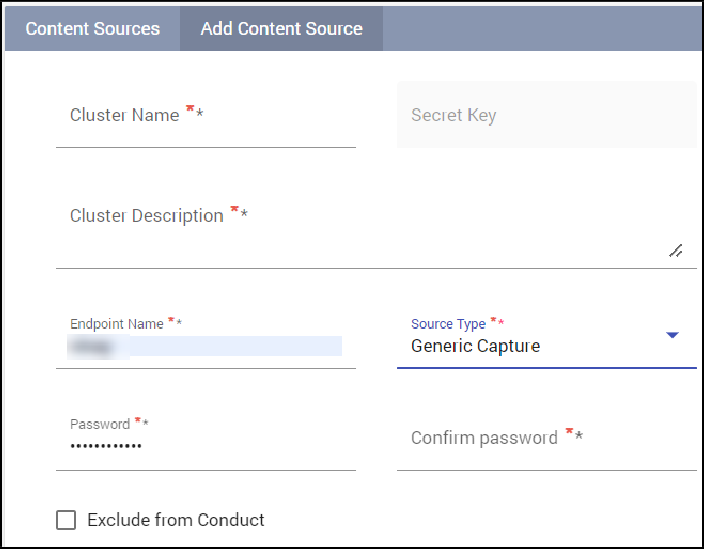
- Select the Source Type as Generic Capture from the drop-down list and enter the required values described in the following table:
| Field | Description | Mandatory Field? |
|---|---|---|
| Endpoint Name | The authentciatoin name for Generic Capture to ingest data in Enterprise Archive. | Yes |
| Internal Domain Names | Type all the domains, in separate lines. These domains are identfiied as INTERNAL | No |
| by Enterprise Archive. Note Enclose the domain names in quotatoins for the exact match. Example “EnterpriseArchive.com” smarsh.com outlook.smarsh.com no-reply- confleunce@smarsh.com salesforce.smarsh.com Important This field is disabled by default. Contact Smarsh Support to enable this field. | ||
|---|---|---|
| Password | The authentciatoin password for Generic Capture to ingest data in Enterprise Archive. | Yes |
| Confirm Password | The authentciatoin password for Generic Capture to ingest data in Enterprise Archive. (Re-enter the password) | Yes |
- Click Save.
Advanced Options Exclude from Conduct (Supervisory Reviews):
You can select this option to ensure historical content ingested into Enterprise Archive that has already been reviewed, can be excluded from being supervised by the Conduct Intel application.
Enabling this checkbox will ensure this content is not part of any of the Conduct Intel review queues and Conduct Intel Admin search interfaces.
This content can however be searched for from the Archive Management, and Case Management search interface.
This content can be searched for from the Supervision Archive search interface, if the user has the Full Archive Access permission enabled.
Important
Exclude from Conduct currently works at the Content Source level. Excluding one Endpoint ID from Conduct will exclude all other Endpoints within the Content source as per the current system behavior. Exercise caution when enabling this configuration.
Chain of Custody
You can select the Enforce Chain Of Custody checkbox to ensure data integrity that can be implemented at the cluster level.
Enabling this checkbox will enforce a CoC check on all communication that is ingested from the content source. Communications that do not contain CoC hashes or fail the CoC check will be rejected.
Enabling/disabling the checkbox will prompt the user with a on-screen message requesting confirmation of the the user action.
The enabling CoC action will be captured in the User Activity log.
This field is disabled by default. Contact Smarsh Support to enable this field.
A feature flag is available to include a new Search Tier dropdown field, in both the Add Content Source and Edit Content Source menu options. This dropdown allows you to choose from the following options:
Promotion: Select this option to include Tier 2 promotional content in the search results.
Tier 1: Select this option to search exclusively within the Tier 1 data.
Contact Smarsh support to enable this feature.